See QHRM Task in Action
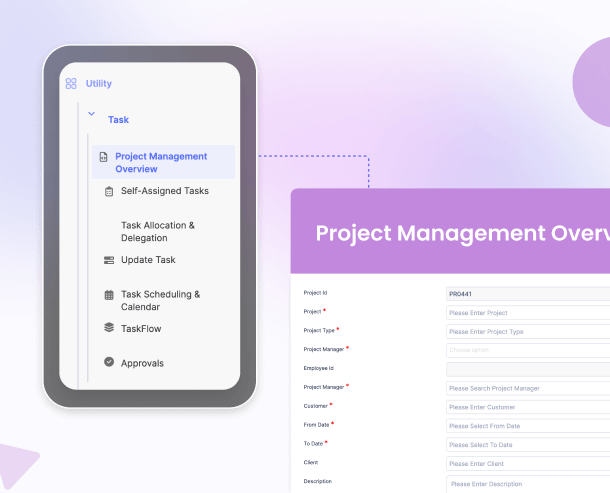
Mobile App
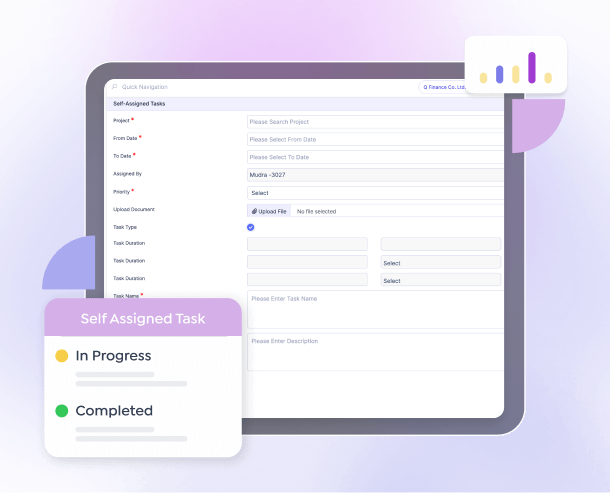
Web Interface
What is Task?
QHRM Task is a project and task management module built directly into your HR platform. Unlike standalone project tools, every task is connected to your people data — employee profiles, leave calendars, performance goals, and team structures. This means managers assign work with full visibility of who is available, who is overloaded, and who has the right skills.
Whether your organisation operates in Myanmar, Singapore, Thailand, Vietnam, Cambodia, or India, Task helps you coordinate cross-functional projects, manage HR initiatives, and keep day-to-day deliverables on track. From onboarding checklists to company-wide compliance drives, every piece of work is organised, assigned, and visible.
This module integrates seamlessly with People, Performance, Leave Management, and all other QHRM modules — so every task assignment is backed by real-time employee context.
Key Features & Benefits
Task Creation & Assignment
Create tasks with detailed descriptions, due dates, priorities, and assignees. Set dependencies and break work into subtasks for complex deliverables. Every task links to the assignee's employee profile, so managers see role, department, and current workload at a glance before assigning.
Project Organisation
Group related tasks into projects with milestones, deadlines, and ownership. Track project health through completion percentages and status indicators. Whether it is an HR policy rollout across Southeast Asia or an office relocation in India, keep every moving part visible and accountable.
Kanban Boards
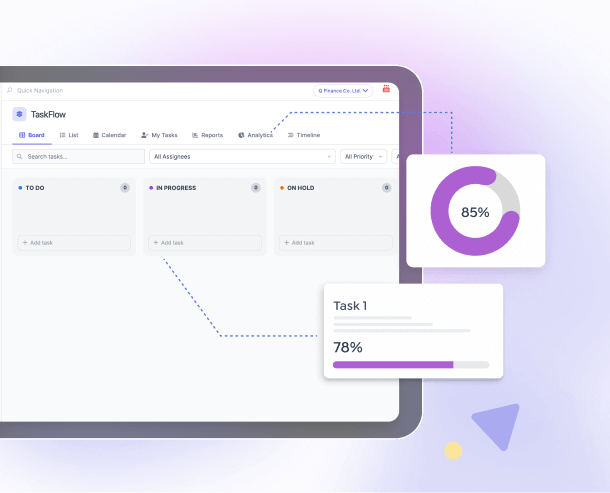
Visualise work on customisable Kanban boards with drag-and-drop task movement between columns. Filter boards by assignee, priority, department, or project. Teams across your organisation can see at a glance what is in progress, what is blocked, and what is complete.
Team Capacity Management
View each team member's current task load, upcoming leave from Leave Management, and pending deadlines on a single capacity dashboard. Redistribute work before bottlenecks form, prevent burnout, and ensure balanced allocation across your team.
Gantt Charts & Timelines
View project timelines on interactive Gantt charts showing task dependencies, durations, and critical paths. Identify scheduling conflicts and potential delays early. Adjust timelines by dragging tasks, and the system automatically recalculates dependent deadlines.
Collaboration & Comments
Collaborate on tasks with threaded comments, file attachments, and @mentions. Keep all project communication in context alongside the work itself. This eliminates scattered email threads and ensures important decisions and updates are never lost.
Recurring Task Templates
Create templates for repeating HR processes — onboarding checklists, monthly payroll preparation, quarterly reviews, annual compliance audits. Templates auto-generate tasks on a defined schedule with pre-set assignees and deadlines, ensuring consistency and saving hours of manual setup.
Priority & Status Management
Categorise tasks by priority (critical, high, medium, low) and track status (to do, in progress, review, done). Filter and sort tasks effortlessly. Critical items are surfaced immediately so your team can focus on what matters most.
Progress Tracking & Time Logs
Track task progress with completion percentages and time logs. Understand where effort is being spent, identify efficiency opportunities, and improve future project estimation. Time data feeds into Payroll for project-based billing or cost allocation.
Notifications & Deadline Alerts
Receive push notifications and email alerts for new assignments, approaching deadlines, status changes, and overdue tasks. Configurable reminder schedules ensure nothing slips through the cracks, even across different time zones in Southeast Asia and India.
Reporting & Analytics
Generate detailed reports on project completion rates, task aging, team workload distribution, overdue items, and time-to-completion trends. Identify bottlenecks and optimise resource allocation. Export reports to Excel or PDF for leadership reviews and stakeholder updates.
Mobile Access
Access the full task management experience on iOS and Android. View assignments, update progress, add comments, and receive push notifications wherever you are. Ideal for managers overseeing field teams or multi-site operations across Southeast Asia.
Why Choose QHRM Task?
-
HR-Integrated Task Management
Unlike generic project tools, Task is embedded in your HR platform. Every task assignment considers the employee's role, workload, leave schedule, and performance objectives. You manage work and people in one place — no context switching, no data silos.
-
Southeast Asia & India Localisation
Purpose-built for organisations in Myanmar, Singapore, Thailand, Vietnam, Cambodia, and India. Support local languages, time zones, and regional work calendars. Coordinate cross-border projects with teams that may span multiple countries in the region.
-
Seamless Integration with 15 Other Modules
Task connects with all other QHRM modules. Link tasks to performance goals, factor in leave schedules, reference documents, and track time against payroll — all from one unified platform.
-
Flexible pricing
Task is quoted alongside the rest of your modules. No hidden fees, no per-project charges. View all pricing plans.
Who Needs Task?
HR Teams Managing Initiatives
HR departments running multiple concurrent projects — policy rollouts, benefits enrolment drives, compliance audits, or engagement programmes — need a structured system to track every deliverable and ensure nothing is missed.
People Managers & Team Leads
Managers who need to assign work, monitor progress, and balance workloads across their teams. The capacity dashboard ensures fair distribution and prevents individual overload, especially when managing remote or distributed teams.
Multi-Location Businesses
Organisations with offices across Southeast Asia and India can coordinate cross-border projects in one platform. Assign tasks to teams in different countries with time-zone-aware deadlines and centralised progress tracking. Enterprise solutions.
SMEs Seeking Structure
Small and medium enterprises that have outgrown spreadsheets and chat-based task tracking. Task provides the structure needed to scale operations without adding complexity. SME solutions.
Related Products & Resources
Frequently Asked Questions
How does Task integrate with other QHRM modules?
Task connects seamlessly with all 16 QHRM modules. Tasks can reference employee records from People, link to performance goals in Performance, and factor in leave schedules from Leave Management. This ensures assignments are always informed by real-time people data.
Can I assign tasks to employees across multiple offices in Southeast Asia?
Yes. Task supports multi-location task assignment across Myanmar, Singapore, Thailand, Vietnam, Cambodia, and India. You can assign work to individuals or teams regardless of office location, with time-zone-aware due dates and notifications.
Does Task include Kanban boards?
Yes. You can visualise work on Kanban boards with customisable columns representing task stages. Drag and drop tasks between columns to update status instantly. Boards can be filtered by assignee, priority, department, or project.
How does team capacity management work?
The capacity dashboard shows each team member's current workload, upcoming leave, and task deadlines. Managers can see who has bandwidth before assigning new work, preventing burnout and ensuring balanced distribution across the team.
Can I create recurring task templates for HR processes?
Yes. Create templates for repeating processes such as onboarding checklists, monthly payroll preparation, quarterly performance reviews, or annual compliance audits. Templates auto-generate tasks on a schedule with pre-set assignees, priorities, and deadlines.
What reporting is available for project progress?
Generate reports on project completion rates, task aging, team workload distribution, overdue items, and time-to-completion trends. Reports can be exported to Excel or PDF and shared with leadership for project reviews.
Which QHRM pricing plan includes Task?
Task is available with flexible pricing, quoted per organisation rather than per seat. View pricing details.
Is Task accessible on mobile devices?
Yes. The full task management experience is available on the QHRM mobile app for iOS and Android. Employees can view assignments, update progress, add comments, and receive push notifications for new tasks and approaching deadlines.
Ready to Streamline Team Workflows?
Bring task management into your HR platform and connect work to performance. Start your free trial.