
Free HR Software for Unlimited Employees — Free for Life
QHRM is free HR software you can run your whole company on — unlimited employees, unlimited users, free for life. Not a trial. Not a 25-employee cap. Fifty of the features below cost you nothing, forever.
- Unlimited employees
- Unlimited users
- 50 features included
- Live production account
- No credit card
50
features on the free plan
∞
employees, no cap
150+
configurable employee fields
₭0
for life
Real HR software. Genuinely free. Used in production.
Most free HR software is a demo with the doors locked — five employees, read-only exports, a countdown to an upgrade call. QHRM's free plan is the same product our paying customers use, with the employee management module switched fully on and no limit on how many people you put in it.
Sign up, verify your email and mobile number, and your company is created in a live production account. Import your team from Excel the same afternoon. There is no credit card field, no sales qualification, and no expiry date on the free plan.
When you eventually want Leave, Attendance or Payroll running on top of the employee data you have already built, they are there — but you are never pushed, and nothing you entered while on the free HR software plan has to be re-keyed.
Everything you get on the free HR software plan
Not a feature list from the paid tiers with most of it greyed out. This is what is switched on the moment your free account is created — all fifty of these, for unlimited employees, at no cost.
Employee Directory & Records
Everyone in your company in one searchable, filterable, exportable place.
Employee Directory
A searchable, paginated list of every person in your company — name, code, department, designation, branch, status — in one screen.
Quick Search & Alpha Search
Type-ahead search across name, employee code and email, plus A–Z jump letters to reach anyone in two clicks.
Advanced Filters
Build precise queries with operators like is, is between, is before/after, is empty and has any value — across department, branch, status, joining date, gender, category and more.
Dynamic Columns
Show, hide and reorder any grid column, with a sticky header and saved layout so the list always looks the way you work.
Field Configuration
Decide which of the 150+ employee fields are visible, which are mandatory, and what each one is called — so the HR form matches your company, not a template.
Employee Dossier
A single slide-in drawer holding the complete employee record — identity, contact, work info, payroll, statutory, settings — grouped into clean sections.
Quick Entry Mode
Add a new joiner with only the essential fields and complete the rest later. Ideal for fast bulk hiring.
Bulk Import from Excel
Download a ready-made template, fill it, upload it. Choose Import New or Update Existing to onboard or mass-edit hundreds of employees at once.
Bulk Export
Export the current filtered view — with your chosen columns — straight to Excel.
Employee Photo Upload & Crop
Upload and crop profile photos in-browser; initials are shown automatically until a photo exists.
Auto-Generated Employee Codes
Employee codes and temp codes generated by rule, so numbering stays unique and consistent.
Status Lifecycle Views
Filter instantly by Active, Probation, Notice, Inactive or Ex-Employees.
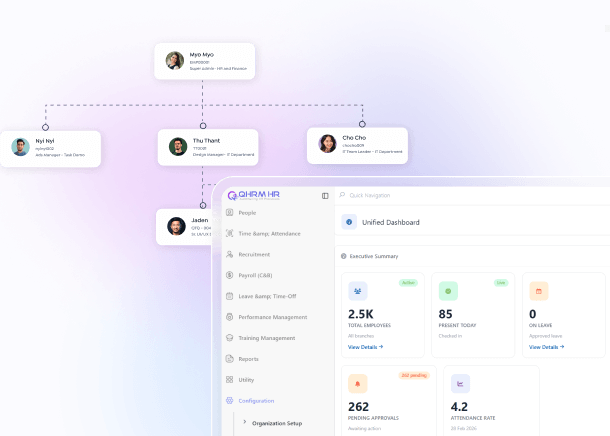
Organisation Chart
An auto-drawn reporting tree built from your live employee data — no separate diagram to maintain.
Reporting Hierarchy
Assign a reporting manager, a secondary manager or reporting-by-designation, and use it to drive who sees whose data.
Department-Driven Defaults
Pick a department and the designation, branch, approval workflow and salary structure defaults cascade in automatically.
The Employee 360° Profile
One record per person, deep enough that you never need a side spreadsheet again.
Overview Tab
A hero card with photo, employee ID, site, joining date, tenure, employment type, category, grade and reporting manager — the whole person at a glance.
Employment Tab
Job title, job code, grade/rank, employment type, contract dates, probation end, cost centre, work location and organisation placement.
Career Tab
The employee's internal journey — promotions, transfers, designation and grade changes over time.
Attendance Tab
Daily attendance records plus a six-month attendance trend chart per employee.
Leave Tab
Leave balances by type, entitlements, and the employee's full leave history.
Compensation Tab
Salary structure, CTC and payslips — visible only to users with explicit salary-view permission.
Performance Tab
Appraisal ratings and review history attached to the employee record.
Engagement Tab
Recognition, kudos and engagement activity for that individual.
Records Tab
Every document, certificate and file belonging to the employee, in one vault.
Contact & Emergency Details
Work and personal email, work and personal phone, plus emergency contacts with relationship.
Education & Qualifications
Degrees, institutions, years and certificates — with a qualification master you can extend on the fly.
Work Experience History
Previous employers, roles and durations captured as structured records, not free text.
Address Records
Permanent and current addresses maintained separately, with full change history.
Bank Account Details
Bank, branch, account number and payment mode — ready for payroll disbursement.
Document Vault with Types & Expiry
Upload passports, NRC/national ID, contracts and certificates against configurable document types, with validity dates.
Asset Allocation
Track what company assets an employee holds, when they were issued, and what is recoverable on resignation.
Benefits & Allowances
Record the benefits and allowances granted to each employee, with effective dates.
Identity & Statutory Documents
Passport, NRC, TIN, PF, ESIC, HRN and other statutory identifiers captured in one structured block.
Professional Licences
Hospital licences, primary-source verification and registration numbers — built for regulated industries like healthcare.
Access, Roles & Workflow
Who can see what, who approves what — enforced at the data layer, not just hidden on screen.
User Account Provisioning
Create the employee's login from within their record — login email, user code, role — or disable login entirely for non-system staff.
Role & Permission Sets
Assign a permission set and preview exactly what that person will be able to see and do before you save.
Reportee-Scoped Data Access
Managers automatically see only their own team's data; HR sees the whole company. Enforced at the data layer, not just the screen.
Per-Employee Approval Workflow
Each employee inherits their department's approval chain, with the option to override approvers and add additional approvers individually.
Salary Structure Assignment
Attach a salary structure to the employee, with the calculation formula viewable inline.
Payroll Configuration
Set salary type (monthly, weekly, daily, hourly), salary cycle, payment mode, payroll group and cost centre per employee.
Leave Setup per Employee
Assign leave types, opening balances and days-per-year entitlements at the individual level.
Attendance & Shift Settings
Default shift, roster group, duty type, mode of attendance, biometric code and a per-employee late threshold.
Contracts, Letters & Documents
Generate, issue and email every HR document from the same record the data lives in.
Employment Contract Letters
Generate contracts from bilingual templates with the employee's data, witnesses, dates and clauses merged in — then issue them.
Contract Issue & Extension
Issuing a contract emails the employee automatically; existing contracts can be extended without re-creating them.
Document Templates
Pick an employee, pick a template, preview the merged document and generate it — offer letters, confirmations, experience letters, warnings, anything you define.
Email Documents Directly
Send generated documents from the system with a custom subject and body, CC/BCC and insertable merge variables. Every generation is logged.
Movement, Exits & Referrals
The full lifecycle, audited — including the part where people leave.
Employee Change History
A full audit trail of department, designation, salary, grade and reporting changes — showing old → new, who changed it and when.
Self-Service Resignation
Employees submit their own resignation with reason and last working day, preview the settlement, and withdraw it before approval.
HR Resignation & Offboarding Queue
Every exit in one queue with approval routing, notice period, exit type, settlement print, asset clearance and an exit formalities checklist.
Employee Referrals
Employees refer candidates with contact details, position and resume; HR moves each referral through a status pipeline with remarks — so referral credit is never lost.
And wrapped around all of it
The things that make the fifty above feel like one system rather than fifty screens.
People Dashboard
A KPI strip for active headcount, probation, notice, new hires, exits, attrition % and average tenure, plus Overview, Engagement and Demographics chart views.
Report Catalogue
Employee Master, New Comer, Resign and Turnover reports with personalisable columns, saved filters and Excel export.
Multi-Language UI
Every label localised — English, Burmese and more — so your team reads the system in the language they work in.
Multi-Branch / Multi-Company
Full tenant isolation with branch, division and location structure, on the free plan as well as the paid ones.
So what's the catch?
Fair question — most free HR software has one. Here is ours, stated plainly.
You verify who you are
Email and mobile number verification is required at sign-up. That is the only thing we ask for, and it is how we reach you if something needs attention on your account.
Free covers employee management
The fifty features on this page — the complete employee record, directory, org chart, documents, reports and access control. Leave, Attendance and Payroll processing are paid modules you can add later, or never.
We hope you grow into a paid plan
That is the honest commercial logic. Companies that outgrow employee management usually want Payroll next. Until then the free plan stays free, with no employee cap and no expiry.
Free HR software questions, answered
Is QHRM really free HR software, or a free trial?
It is a free plan, not a trial. There is no expiry date and no countdown. The employee management module stays free for life on your account.
How many employees can I add on the free plan?
Unlimited. There is no employee cap and no per-user charge — add five people or five thousand, the price is the same.
Do I need a credit card to sign up?
No. There is no card field anywhere in sign-up and no payment details are collected on the free plan.
Why do I have to verify my email and mobile number?
Because your free account is a real production company, not a sandbox — verification protects it, and it is how our team reaches you about your data. It takes under a minute.
Can I import my existing employee data?
Yes. Download the Excel template, fill it and upload — Import New for onboarding or Update Existing to mass-edit. Bulk import and export are both on the free plan.
Is my data safe on a free plan?
It sits on the same hosted, encrypted, backed-up infrastructure as every paying customer's data. Free tier does not mean second-class infrastructure.
What happens if I want Leave, Attendance or Payroll later?
You switch on the Professional plan and they run on the employee data you have already built. Nothing is re-keyed and nothing is lost.
Can I export my data if I leave?
Yes. Bulk export to Excel is a free-plan feature, so your data is never held hostage.
Start using free HR software today
Unlimited employees. Free for life. No credit card, no sales call. Verify your email and mobile number and your company is live in about two minutes.